2. Installation
2.1. Getting pugixml
pugixml is distributed in source form. You can either download a source distribution or clone the Git repository.
2.1.1. Source distributions
You can download the latest source distribution as an archive:
pugixml-1.16.zip (Windows line endings) / pugixml-1.16.tar.gz (Unix line endings)
The distribution contains library source, documentation (the manual you’re reading now and the quick start guide) and some code examples. After downloading the distribution, install pugixml by extracting all files from the compressed archive.
If you need an older version, you can download it from the version archive.
2.1.2. Git repository
The Git repository is located at https://github.com/zeux/pugixml/. There is a Git tag "v{version}" for each version; also there is the "latest" tag, which always points to the latest stable release.
For example, to checkout the current version, you can use this command:
git clone https://github.com/zeux/pugixml
cd pugixml
git checkout v1.16
The repository contains library source, documentation, code examples and full unit test suite.
Use latest tag if you want to automatically get new versions. Use other tags if you want to switch to new versions only explicitly. Also please note that the master branch contains the work-in-progress version of the code; while this means that you can get new features and bug fixes from master without waiting for a new release, this also means that occasionally the code can be broken in some configurations.
2.1.3. Packages
pugixml is available as a package via various package managers. Note that most packages are maintained separately from the main repository so they do not necessarily contain the latest version.
Here’s an incomplete list of pugixml packages in various systems:
-
Linux (Ubuntu, Debian, Fedora, Arch Linux, other distributions)
-
OSX, via Homebrew
-
Windows, via NuGet
2.2. Building pugixml
pugixml is distributed in source form without any pre-built binaries; you have to build them yourself.
The complete pugixml source consists of three files - one source file, pugixml.cpp, and two header files, pugixml.hpp and pugiconfig.hpp. pugixml.hpp is the primary header which you need to include in order to use pugixml classes/functions; pugiconfig.hpp is a supplementary configuration file (see Additional configuration options). The rest of this guide assumes that pugixml.hpp is either in the current directory or in one of include directories of your projects, so that #include "pugixml.hpp" can find the header; however you can also use relative path (i.e. #include "../libs/pugixml/src/pugixml.hpp") or include directory-relative path (i.e. #include <xml/thirdparty/pugixml/src/pugixml.hpp>).
2.2.1. Building pugixml as a part of another static library/executable
The easiest way to build pugixml is to compile the source file, pugixml.cpp, along with the existing library/executable. This process depends on the method of building your application; for example, if you’re using Microsoft Visual Studio [1], Apple Xcode, Code::Blocks or any other IDE, just add pugixml.cpp to one of your projects.
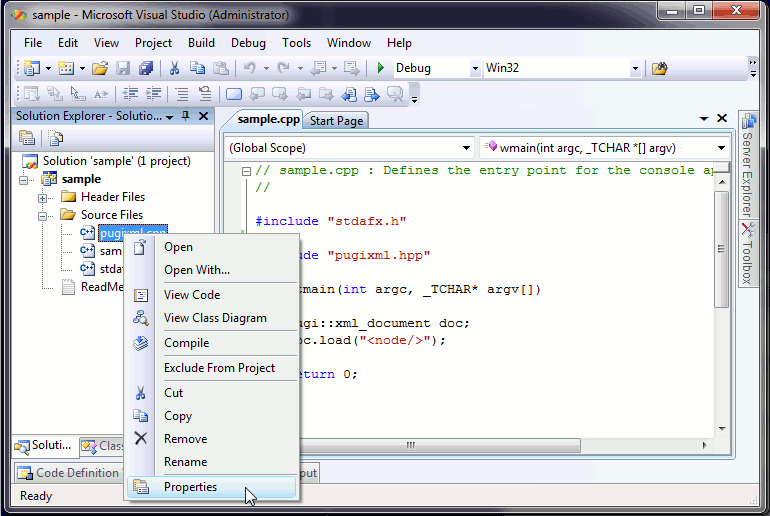
If you’re using Microsoft Visual Studio and the project has precompiled headers turned on, you’ll see the following error messages:
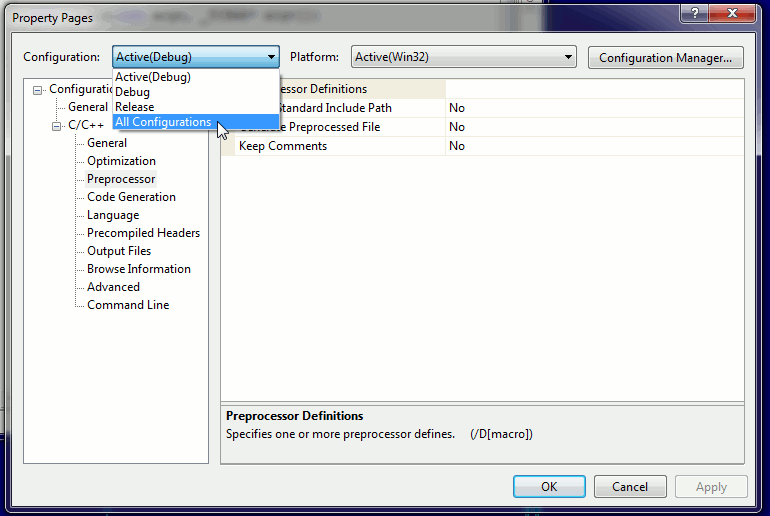
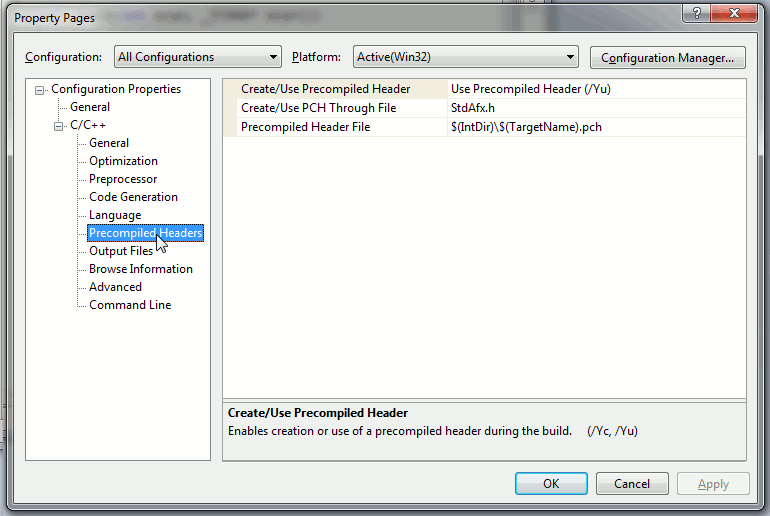
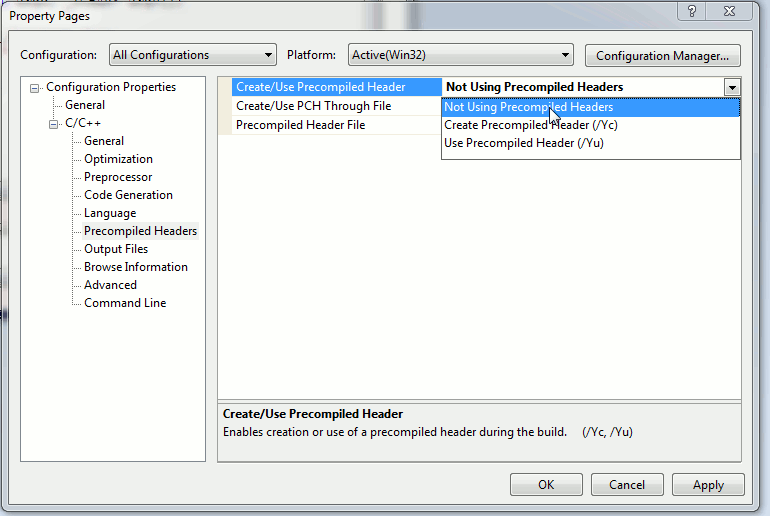
pugixml.cpp(3477) : fatal error C1010: unexpected end of file while looking for precompiled header. Did you forget to add '#include "stdafx.h"' to your source?The correct way to resolve this is to disable precompiled headers for pugixml.cpp; you have to set "Create/Use Precompiled Header" option (Properties dialog → C/C++ → Precompiled Headers → Create/Use Precompiled Header) to "Not Using Precompiled Headers". You’ll have to do it for all project configurations/platforms (you can select Configuration "All Configurations" and Platform "All Platforms" before editing the option):
|
|
|
|
2.2.2. Building pugixml as a standalone static library
It’s possible to compile pugixml as a standalone static library. This process depends on the method of building your application; pugixml distribution comes with project files for several popular IDEs/build systems. There are project files for Apple XCode, Code::Blocks, Codelite, Microsoft Visual Studio 2005, 2008, 2010+, and configuration scripts for CMake and premake4. You’re welcome to submit project files/build scripts for other software; see Feedback.
There are two projects for each version of Microsoft Visual Studio: one for dynamically linked CRT, which has a name like pugixml_vs2008.vcproj, and another one for statically linked CRT, which has a name like pugixml_vs2008_static.vcproj. You should select the version that matches the CRT used in your application; the default option for new projects created by Microsoft Visual Studio is dynamically linked CRT, so unless you changed the defaults, you should use the version with dynamic CRT (i.e. pugixml_vs2008.vcproj for Microsoft Visual Studio 2008).
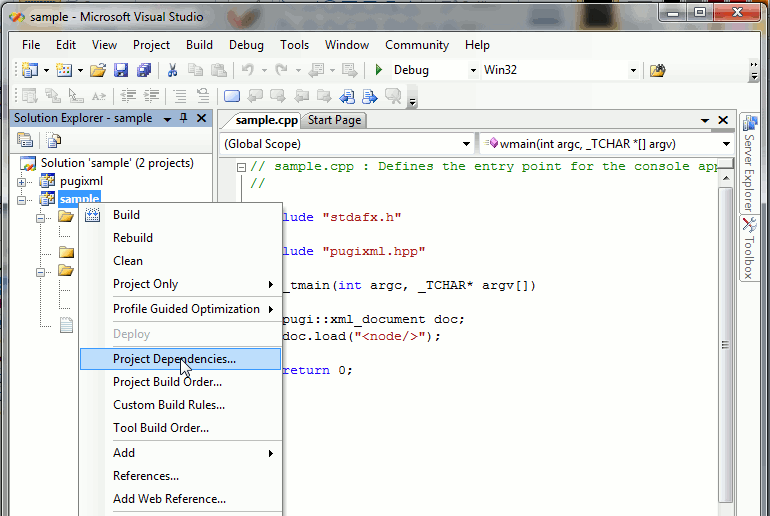
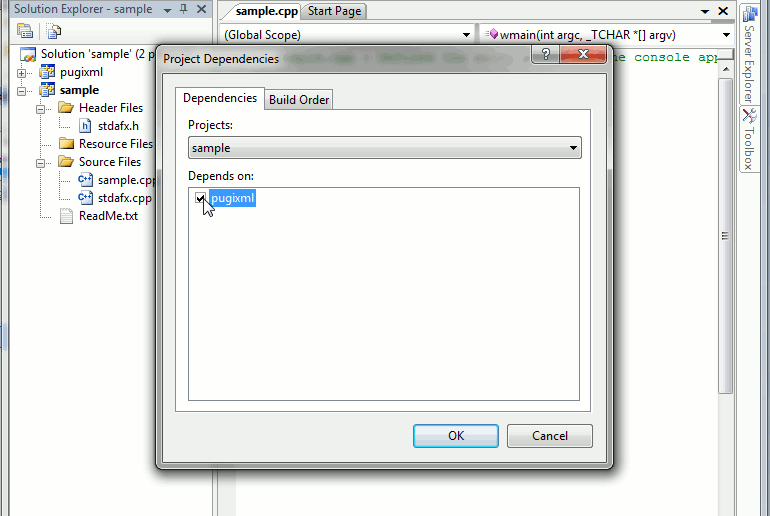
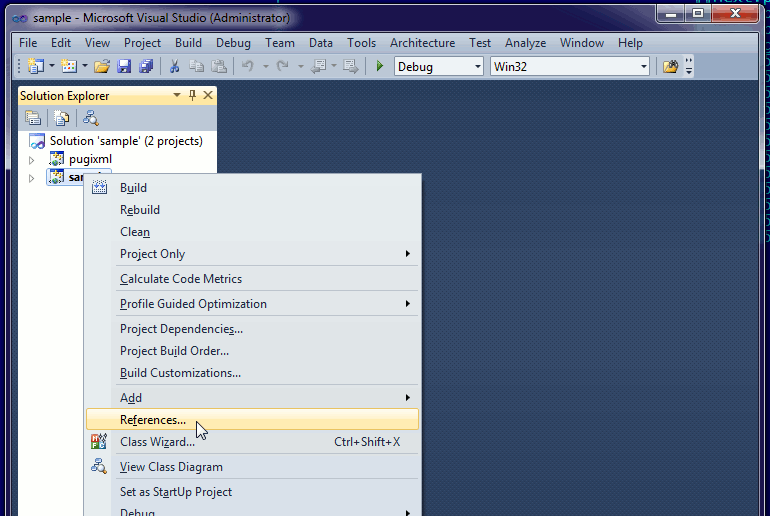
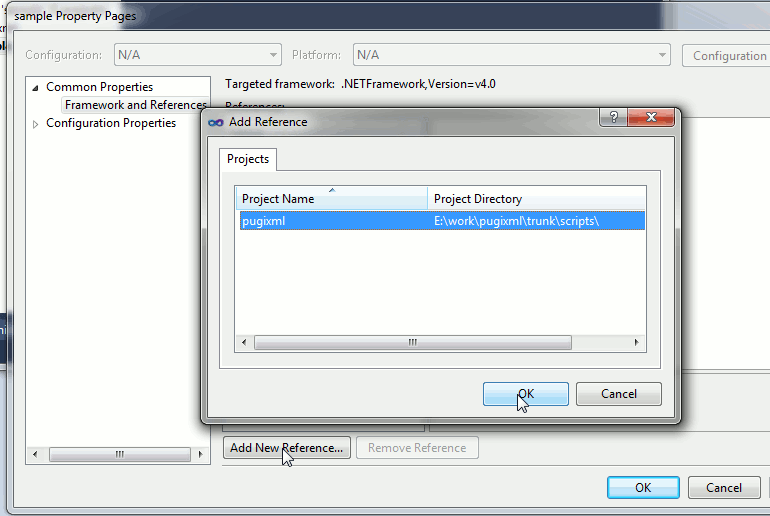
In addition to adding pugixml project to your workspace, you’ll have to make sure that your application links with pugixml library. If you’re using Microsoft Visual Studio 2005/2008, you can add a dependency from your application project to pugixml one. If you’re using Microsoft Visual Studio 2010+, you’ll have to add a reference to your application project instead. For other IDEs/systems, consult the relevant documentation.
| Microsoft Visual Studio 2005/2008 | Microsoft Visual Studio 2010+ | ||
|---|---|---|---|
|
|
|
|
2.2.3. Building pugixml as a standalone shared library
It’s possible to compile pugixml as a standalone shared library. The process is usually similar to the static library approach; however, no preconfigured projects/scripts are included into pugixml distribution, so you’ll have to do it yourself. Generally, if you’re using GCC-based toolchain, the process does not differ from building any other library as DLL (adding -shared to compilation flags should suffice); if you’re using MSVC-based toolchain, you’ll have to explicitly mark exported symbols with a declspec attribute. You can do it by defining PUGIXML_API macro, i.e. via pugiconfig.hpp:
#ifdef _DLL
    #define PUGIXML_API __declspec(dllexport)
#else
    #define PUGIXML_API __declspec(dllimport)
#endif
Caution
|
If you’re using STL-related functions, you should use the shared runtime library to ensure that a single heap is used for STL allocations in your application and in pugixml; in MSVC, this means selecting the 'Multithreaded DLL' or 'Multithreaded Debug DLL' to 'Runtime library' property (/MD or /MDd linker switch). You should also make sure that your runtime library choice is consistent between different projects. |
2.2.4. Using pugixml in header-only mode
It’s possible to use pugixml in header-only mode. This means that all source code for pugixml will be included in every translation unit that includes pugixml.hpp. This is how most of Boost and STL libraries work.
Note that there are advantages and drawbacks of this approach. Header mode may improve tree traversal/modification performance (because many simple functions will be inlined), if your compiler toolchain does not support link-time optimization, or if you have it turned off (with link-time optimization the performance should be similar to non-header mode). However, since compiler now has to compile pugixml source once for each translation unit that includes it, compilation times may increase noticeably. If you want to use pugixml in header mode but do not need XPath support, you can consider disabling it by using PUGIXML_NO_XPATH define to improve compilation time.
To enable header-only mode, you have to define PUGIXML_HEADER_ONLY. You can either do it in pugiconfig.hpp, or provide them via compiler command-line.
Note that it is safe to compile pugixml.cpp if PUGIXML_HEADER_ONLY is defined - so if you want to i.e. use header-only mode only in Release configuration, you can include pugixml.cpp in your project (see Building pugixml as a part of another static library/executable), and conditionally enable header-only mode in pugiconfig.hpp like this:
#ifndef _DEBUG
    #define PUGIXML_HEADER_ONLY
#endif
2.2.5. Additional configuration options
pugixml uses several defines to control the compilation process. There are two ways to define them: either put the needed definitions to pugiconfig.hpp (it has some examples that are commented out) or provide them via compiler command-line. Consistency is important: the definitions should match in all source files that include pugixml.hpp (including pugixml sources) throughout the application. Adding defines to pugiconfig.hpp lets you guarantee this, unless your macro definition is wrapped in preprocessor #if/#ifdef directive and this directive is not consistent. pugiconfig.hpp will never contain anything but comments, which means that when upgrading to a new version, you can safely leave your modified version intact.
PUGIXML_WCHAR_MODE define toggles between UTF-8 style interface (the in-memory text encoding is assumed to be UTF-8, most functions use char as character type) and UTF-16/32 style interface (the in-memory text encoding is assumed to be UTF-16/32, depending on wchar_t size, most functions use wchar_t as character type). See Unicode interface for more details.
PUGIXML_CHARCONV_FLOAT will use <charconv> for floating-point number formatting instead of <stdio.h> functions, which requires C++17 and UTF-8 interface. Note that the conversion will then ignore the locale and always act as if the default C locale is used.
PUGIXML_COMPACT define activates a different internal representation of document storage that is much more memory efficient for documents with a lot of markup (i.e. nodes and attributes), but is slightly slower to parse and access. For details see Compact mode.
PUGIXML_NO_XPATH define disables XPath. Both XPath interfaces and XPath implementation are excluded from compilation. This option is provided in case you do not need XPath functionality and need to save code space.
PUGIXML_NO_STL define disables use of STL in pugixml. The functions that operate on STL types are no longer present (i.e. load/save via iostream) if this macro is defined. This option is provided in case your target platform does not have a standard-compliant STL implementation.
PUGIXML_NO_EXCEPTIONS define disables use of exceptions in pugixml. This option is provided in case your target platform does not have exception handling capabilities.
PUGIXML_API, PUGIXML_CLASS and PUGIXML_FUNCTION defines let you specify custom attributes (i.e. declspec or calling conventions) for pugixml classes and non-member functions. In absence of PUGIXML_CLASS or PUGIXML_FUNCTION definitions, PUGIXML_API definition is used instead. For example, to specify fixed calling convention, you can define PUGIXML_FUNCTION to i.e. __fastcall. Another example is DLL import/export attributes in MSVC (see Building pugixml as a standalone shared library).
Note
|
In that example PUGIXML_API is inconsistent between several source files; this is an exception to the consistency rule. |
PUGIXML_MEMORY_PAGE_SIZE, PUGIXML_MEMORY_OUTPUT_STACK and PUGIXML_MEMORY_XPATH_PAGE_SIZE can be used to customize certain important sizes to optimize memory usage for the application-specific patterns. For details see Memory consumption tuning.
PUGIXML_HAS_LONG_LONG define enables support for long long type in pugixml. This define is automatically enabled if your platform is known to have long long support (i.e. has C++11 support or uses a reasonably modern version of a known compiler); if pugixml does not recognize that your platform supports long long but in fact it does, you can enable the define manually.
PUGIXML_HAS_STRING_VIEW define enables function overloads that accept std::string_view arguments. This define is automatically enabled if built targeting C++17 or later; if pugixml does not recognize that your platform supports std::string_view but in fact it does, you can enable the define manually.
2.3. Portability
pugixml is written in standard-compliant C++ with some compiler-specific workarounds where appropriate. pugixml can be compiled with any version of the C++ standard starting from C++98; newer standards automatically enable additional functionality (move semantics and range-based for support in C++11, std::string_view overloads in C++17). Each version is tested with a unit test suite with code coverage exceeding 99%.
pugixml runs on a variety of desktop platforms (including Microsoft Windows, Linux, FreeBSD, Apple MacOSX and Sun Solaris), game consoles (including Microsoft Xbox 360, Microsoft Xbox One, Nintendo Wii, Sony Playstation Portable and Sony Playstation 3) and mobile platforms (including Android, iOS, BlackBerry, Samsung bada and Microsoft Windows CE).
pugixml supports various architectures, such as x86/x86-64, PowerPC, ARM, MIPS and SPARC. In general it should run on any architecture since it does not use architecture-specific code and does not rely on features such as unaligned memory access.
pugixml can be compiled using any C++ compiler; it was tested with all versions of Microsoft Visual C++ from 6.0 up to 2026, GCC from 3.4 up to 16, Clang from 3.2 up to 21, as well as a variety of other compilers (e.g. Borland C++, Digital Mars C++, Intel C++, Metrowerks CodeWarrior and PathScale). The code is written to avoid compilation warnings even on reasonably high warning levels.
Note that some platforms may have very bare-bones support of C++; in some cases you’ll have to use PUGIXML_NO_STL and/or PUGIXML_NO_EXCEPTIONS to compile without issues. This mostly applies to old game consoles and embedded systems.
1. All trademarks used are properties of their respective owners.